Murina Display: A Versatile Typeface for Modern Design Workflows
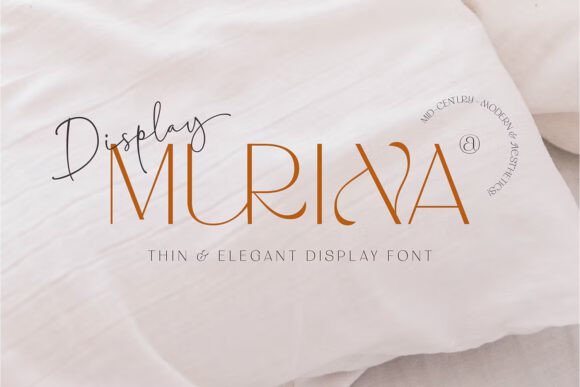
Typography plays a crucial role in shaping the visual identity of any design project. Choosing the right font can enhance readability, reflect brand personality, and evoke specific emotions in your audience. Murina Display is a standout typeface that bridges the gap between classic and contemporary design styles. Its unique blend of sans serif structure with elegant swash elements, subtle Blackletter influence, and detailed ligatures make it a powerful tool for creative professionals across industries.
Understanding Murina Display’s Unique Characteristics
Murina Display is more than just another font—it's a carefully crafted display typeface designed to bring character and clarity to your work. Rooted in Mid-Century Modern aesthetics, this font exudes a timeless charm while incorporating modern sensibilities that align with today’s minimalist trends. The clean sans serif foundation ensures legibility at various sizes, while the swashes and alternate characters add a touch of sophistication and flair.
This combination makes Murina Display ideal for use in branding projects, editorial layouts, packaging designs, digital interfaces, and even personal creative endeavors like invitations or social media content. Whether you're aiming for a vintage-inspired look or a sleek, modern feel, Murina Display adapts seamlessly to both.
Where Murina Display Fits in Your Design Process
Integrating Murina Display into your workflow requires understanding where it adds value. This font shines in the early stages of a project when you’re setting the tone and visual direction. For instance, when creating a logo or designing a website header, Murina Display can help establish a distinct and memorable identity due to its unique character set and stylistic versatility.
During the execution phase, Murina Display supports a wide range of tools and platforms. It works well in Adobe Illustrator and Photoshop, where its stylistic alternates are accessible via the glyphs panel and OpenType menu. These features allow designers to experiment with different letterforms without compromising the font’s integrity or compatibility. In contrast, during the finalization stage, whether you're preparing materials for print or digital distribution, Murina Display remains reliable and consistent across all outputs.
Pre-Project Planning with Murina Display
Before diving into a design project, it’s essential to consider typography as part of your planning process. Murina Display can be a strategic choice if your project involves a mix of retro and modern elements. Start by evaluating the context—will the font be used primarily for headlines, body text, or decorative accents?
- Brand Development: Use Murina Display to draft mood boards or mockups that showcase potential typographic directions for logos or marketing materials.
- Editorial Design: Consider how Murina Display could serve as a title font for magazines, newspapers, or online publications, especially if you want to stand out visually.
- Product Packaging: Think about how the font’s elegance might complement product labels or promotional material, particularly for lifestyle or luxury goods.
Implementation Across Tools and Platforms
Murina Display isn’t limited to high-end design software. It’s available in both OpenType (OTF) and TrueType (TTF) formats, ensuring broad compatibility. This means you can use it in everyday applications such as Microsoft Word, PowerPoint, or CorelDRAW without losing access to its advanced features.
In Adobe Creative Suite, the glyphs panel allows quick access to alternate characters and ligatures. For example, when designing a poster in Illustrator, you might switch from standard to swash versions of certain letters to create a more dynamic headline. In Photoshop, the OpenType menu lets you toggle between different stylistic sets, enabling you to refine your typographic choices efficiently.
If you're working on systems that don’t support OpenType, don’t worry—Murina Display still offers flexibility. On Windows, tools like Character Map or Nexus Font can help you explore and apply alternate characters manually. Mac users can take advantage of Font Book to preview and manage the font’s many variations before implementing them in their projects.
Practical Workflow Integration Tips
To make the most of Murina Display in your workflow, consider these practical tips:
- Use it sparingly: While the font is rich in style, overuse can lead to visual clutter. Reserve it for key typographic elements like titles, headers, or pull quotes.
- Pair it wisely: Combine Murina Display with simpler sans serif or serif fonts for body text to maintain balance and ensure readability.
- Test across mediums: Because of its diverse styling options, test Murina Display in different environments—print, web, mobile—to see how it performs under varying conditions.
- Organize your assets: If you frequently use alternate characters, keep a reference file or list of preferred glyphs to streamline your selection process later.
For example, a small business owner launching a new line of artisanal coffee products might use Murina Display for their logo and packaging headers, then pair it with a clean, modern sans serif for product descriptions and pricing. This approach maintains the brand’s nostalgic yet professional image across all touchpoints.
Collaboration and Consistency
When working with teams or clients, consistency is key. Ensure that everyone involved understands how to access and use Murina Display’s special features. Share clear guidelines about which characters to use for what purpose, and provide sample files that demonstrate best practices. This helps avoid miscommunication and keeps the design language cohesive throughout the project lifecycle.
Additionally, since Murina Display supports multiple formats, confirm that all collaborators have access to either OTF or TTF, depending on their software preferences. This step can prevent unnecessary revisions due to missing glyphs or formatting issues.
Long-Term Use and Quality Control
Fonts like Murina Display are not just temporary tools—they’re long-term assets in your creative arsenal. To maintain quality control over time, document your usage. Create a style guide that includes examples of how Murina Display looks in different weights, colors, and contexts. This will help preserve the intended aesthetic and guide future updates or redesigns.
Also, consider licensing and accessibility. Make sure you understand the terms of use for Murina Display, especially if you plan to use it in commercial projects. And always provide fallback fonts for those who may not have access to it, ensuring that your message remains clear and consistent across all audiences.
Case Study: Murina Display in Action
A graphic designer recently used Murina Display for a client’s wedding invitation suite. They wanted something that felt both romantic and refined. By selecting the swash variants for the couple’s names and using the standard form for the rest of the details, they achieved a harmonious blend of old-world charm and modern simplicity. The result was an invitation that stood out in a sea of generic templates and aligned perfectly with the couple’s vision.
Another user, a blogger specializing in vintage fashion, integrated Murina Display into their website headers and post titles. The font helped reinforce the site’s nostalgic theme while maintaining a clean layout for easier navigation. Readers responded positively, noting the inviting and authentic feel of the content presentation.
Why Choose Murina Display Over Other Fonts?
Many display fonts offer either retro appeal or modern minimalism—but rarely both. Murina Display stands out because it gives you the freedom to adapt its style without switching typefaces entirely. This dual nature reduces the need to juggle multiple fonts, simplifying your design process and enhancing overall cohesion.
Moreover, its compatibility with major design platforms and common office software means fewer technical hurdles. You won't find yourself bogged down by format limitations or missing features, making it a practical choice for both professional and casual use cases.
Exploring Alternatives and Complementary Fonts
While Murina Display is highly versatile, it doesn’t mean it should be the only font in your kit. Explore complementary fonts that match its tone but differ in weight or proportion. For instance, pairing Murina Display with a monospaced code-style font for captions or footnotes can add depth and variety without clashing.
You might also consider using it alongside other Mid-Century Modern-inspired fonts to build a typographic palette that feels intentional and curated. However, always prioritize usability and legibility, especially in mixed-use scenarios where too many fonts can dilute your message.
Best Practices for Using Murina Display Effectively
Here are some tried-and-true methods to ensure you're leveraging Murina Display to its fullest potential:
- Use the alternate characters selectively: Not every word needs a swash or ligature. Apply them where they’ll make the biggest impact, like in titles or signatures.
- Match the font to the message: Murina Display works best when the content it supports is elegant or aspirational. Avoid using it in fast-paced or utilitarian contexts unless intentionally styled for contrast.
- Stay organized: Keep a library of saved compositions or glyphs so you can reuse them across projects, saving time and maintaining brand continuity.
By following these practices, you’ll ensure that Murina Display enhances rather than hinders your creative output. It becomes less about the font itself and more about how it serves your design goals.
Conclusion
Murina Display is a testament to thoughtful design—offering both beauty and functionality in a single package. Whether you're a seasoned designer or just starting out, integrating this font into your workflow can elevate your projects with a touch of timeless elegance. Its adaptability across platforms and its attention to detail make it a valuable addition to your typographic toolkit. With proper planning and implementation, Murina Display can become a signature element of your creative process, delivering strong outcomes that resonate with your audience.